Sega Dreamcast
Play Dreamcast games, plus the Sega NAOMI and Sammy Atomiswave
arcade games built on the same hardware. They all run on Flycast, from one
folder: Roms/Dreamcast (DC)/.
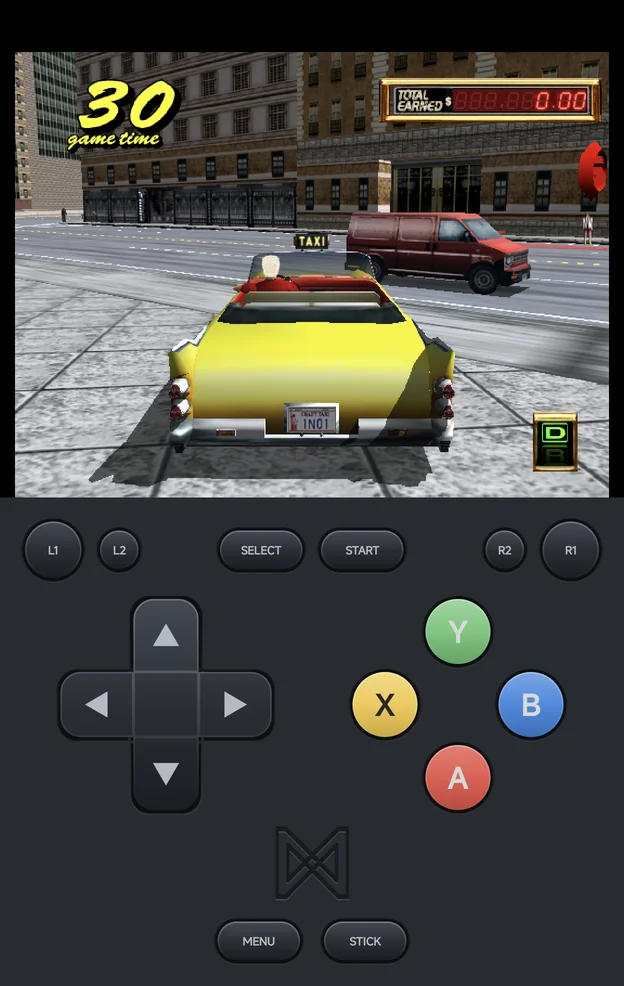
Dreamcast gets the same features as the other systems:
- the in-game menu with save states and auto-resume
- the Game Switcher
- play time in the Game Tracker
- RetroAchievements for disc games
Dreamcast has no cheats.
BIOS
Dreamcast discs need the real BIOS. Put dc_boot.bin in Bios/DC/.
Without it, the game doesn't start and the app says:
Dreamcast needs a BIOS: put dc_boot.bin in Bios/DC/
The arcade games need their own BIOS instead (see
NAOMI and Atomiswave). They don't need
dc_boot.bin.
| File | For |
|---|---|
dc_boot.bin |
Dreamcast discs |
naomi.zip |
NAOMI games |
awbios.zip |
Atomiswave games |
Coming from the handheld
The handheld can run Dreamcast discs without a BIOS. The app can't: put
dc_boot.bin in Bios/DC/ even if your handheld played the games
without it.
Adding games
Put Dreamcast discs in Roms/Dreamcast (DC)/. The app plays .chd, .cdi,
.gdi, .cue and .m3u. A zip or 7z holding one disc plays too; the app
unpacks it on first launch.
A GDI game is a .gdi file plus its track files. Give each GDI game its
own folder, and name the .gdi after the folder:
Roms/Dreamcast (DC)/
├── Soulcalibur (USA).chd
└── Shenmue (USA)/
    ├── Shenmue (USA).gdi
    ├── track01.bin
    ├── track02.raw
    └── track03.bin
The folder shows as one game in the list.
Rename a disc.gdi
Some sets name every sheet disc.gdi. The app doesn't list a folder
whose .gdi is named differently from the folder. Saves, states and
the memory card are named after the file, so every disc.gdi game
would share them. Rename the .gdi to match its folder.
A multi-disc game plays as one game from an .m3u that lists its discs. The
in-game menu then has a Disc row; see
Multi-disc games.
Controls
The face buttons map to the Dreamcast pad by the printed letter: A
is the Dreamcast's A. The Dreamcast pad is lettered like an Xbox pad:
| Position | Dreamcast button |
|---|---|
| Bottom | A |
| Right | B |
| Left | X |
| Top | Y |
| Control | Dreamcast control |
|---|---|
| D-pad | D-pad |
| Left stick | Analog stick |
L2 / R2 |
Analog triggers |
START |
START |
SELECT |
Insert a coin (NAOMI and Atomiswave) |
L3 (press the left stick) |
Test, the operator menu (NAOMI and Atomiswave) |
R3 (press the right stick) |
Service (NAOMI and Atomiswave) |
- The on-screen pad draws
ABXYin the Dreamcast's colours, in the positions above. - With the on-screen pad, the in-game menu follows the drawn letters: the
bottom button (
A) confirms and the right one (B) goes back. - On a controller, a "Press A" prompt means the button printed
A. If a controller is read wrongly, set Controller Layout in Options → Console Settings (see Controls). On a Nintendo-layout pad, set it to Xbox to play with the Dreamcast's positions instead. L3andR3are on controllers only: the on-screen pad has no stick buttons.- On a controller the triggers press as far as you pull them. On the
on-screen pad,
L2andR2press fully. MENU, orSELECT+START, opens the in-game menu. On NAOMI and Atomiswave the game sees theSELECTpress first, so it may count a coin.
Multiplayer
Up to four players can play, each on their own controller; see Local Multiplayer. NAOMI and Atomiswave games take up to four players too. The points below are for Dreamcast discs:
- Every player's controller has the Vibration Pack.
- Only Player 1's controller has a memory card. Games save to Player 1's card.
- To give Players 2 to 4 a card, set Device in Expansion Slot B1, C1 or D1 to VMU in Emulator Settings under Core settings.
Memory cards (VMU)
Every game gets its own memory card, kept with your other saves:
Saves/DC/<game>.A1.bin
For example Saves/DC/Soulcalibur (USA).A1.bin. A GDI game's card is named
after its folder, and an .m3u game shares one card across its discs.
To give a game a fresh, empty card:
- Delete the game's
.A1.binfile inSaves/DC/. - Launch the game. It starts with a blank card.
Renaming a ROM
Renaming a ROM leaves its card behind under the old name, as with any save. Rename the card to match.
More detail
- The names match the handheld's NX Redux, so you can copy a card between your phone and your handheld.
- The arcade games keep their high scores and cabinet settings in
Saves/DC/reicast/.
Save states
Save states work as on every other system: eight slots, plus the auto-save the app makes when you quit.
A Dreamcast save state is about 36 MB, the console's memory stored as it is. Eight full slots for one game take close to 300 MB on your phone.
Settings
Change Dreamcast's settings in Options → Core Options in the in-game menu. You can also set them outside a game, for every game or for one, in Emulator Settings.
The internal resolution starts at 640×480, the Dreamcast's own. Higher values look sharper but cost speed.
NAOMI and Atomiswave
NAOMI and Atomiswave games are MAME-style zips (or 7z). To play them:
- Put the zips straight into
Roms/Dreamcast (DC)/, next to your Dreamcast discs. - Put the board's BIOS zip in
Bios/DC/:naomi.zipfor NAOMI,awbios.zipfor Atomiswave. - Launch the game and press
SELECTto insert a coin, thenSTART.
A few sets need another BIOS zip, such as naomi2.zip for NAOMI 2 games. The
message names the one that's missing.
Don't rename the zips
Flycast finds a game by its short zip name (mslug6.zip, not
Metal Slug 6.zip). The game list still shows readable names:
mslug6.zip shows as Metal Slug 6.
More detail
- Names. Each zip gets its full title from Flycast's own game list.
A Rename Rom or
map.txtalias always wins over that title. - BIOS zips are hidden. A BIOS zip put in the game folder by mistake
is not listed as a game. It still has to be in
Bios/DC/. - Clones. A clone set loads its parent set from the same folder.
- Zipped discs. A zip that isn't one of Flycast's arcade sets is treated as a zipped Dreamcast disc and unpacked.
- Atomiswave BIOS. Both MAME versions of
awbios.zipwork.
When a set won't start
The app checks the BIOS before launch. When the zip is missing, it says, for example:
Metal Slug 6 needs awbios.zip: put it in Bios/DC/
When the BIOS zip is there but a file in it is missing, it names the file:
‹Game› needs naomi.zip with ‹file› in it: put a complete naomi.zip in Bios/DC/
When the game's own zip is incomplete:
‹Game› needs ‹file›, which ‹set›.zip does not have: the set is incomplete or from another MAME version
Get a complete set that matches Flycast's version of MAME.
RetroAchievements
Dreamcast discs use the app's
RetroAchievements support, like the other systems.
The app recognises .chd, .gdi, .cue and .m3u games, and a zipped
disc once it is unpacked.
.cdigames are not recognised.- NAOMI and Atomiswave games are not on RetroAchievements.