Game Switcher
Press SELECT on the main menu or in a game list to open the Game Switcher:
a full-screen view of your recent games that resumes any of them where you
left off. On the main menu the SELECT hint reads Recent.
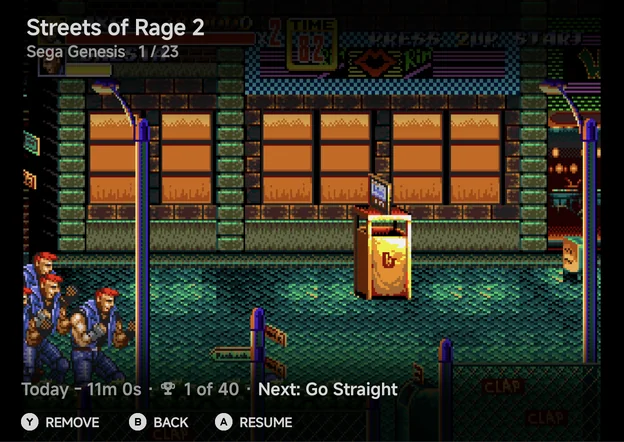
Each game fills the screen with its picture. On top are its name, its console and its place in the list, such as 1 / 23. Above the hints is the game's info line: when you last played it and for how long, its achievements and the next one to unlock.
LEFT/RIGHT, or a swipe left or right, move between games.AResume, or a tap on the picture, continues the game where you left off.YRemove asks Remove "‹name›" from recents? Choose Remove to take the game out of your recent games.BBack, orSELECTagain, returns to where you were.
The picture
The switcher shows the first of these it has for the game:
- the screenshot of its resume point,
- its 3D box art,
- its 2D cover, or else its SteamGridDB grid image, shown in a case,
- No Preview.
See Artwork for where box art comes from.
Always resumable
Quitting a game from the in-game menu saves a hidden resume state, and so does leaving the app while a game is open. So with nearly every core, every game you have played can be resumed. No manual save state is needed. PICO-8 is the exception for now (see Emulators).
Only resumable games are listed
The switcher lists only recent games that can be resumed. With none, it shows No Recents and Play a game to see it here. Unlike the handheld, there is no setting to list every recent game instead. Android games are never listed.
In a game list, X Resume does the same for the highlighted game when it
can be resumed.