Netplay
Two players, two devices, one game. Netplay links your phone with another phone or with an NX Redux handheld (TrimUI Brick, Brick Pro or Smart Pro S), over Wi-Fi or a USB-C cable. Game Boy and Game Boy Advance games get a link cable too, for trades and versus battles.
There is no IP to type. Save data is copied before the match starts, and your own save is never overwritten by someone else's.
Two people on one phone, each with a controller? That is Local Multiplayer instead.
Starting a session
- Both players pick the same game. On the phone, highlight it on Home or
in a game list and press
YNetplay.MENUOptions → Netplay does the same. -
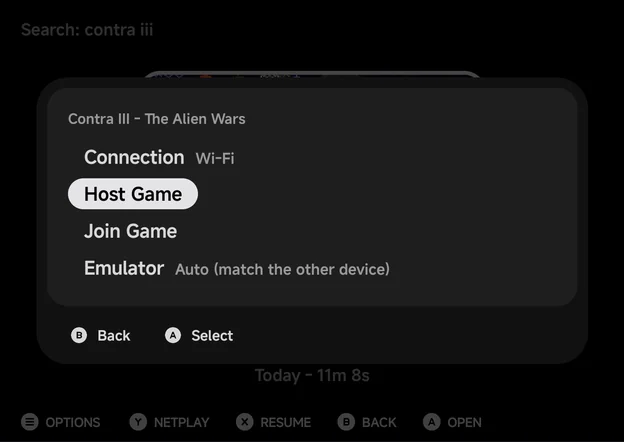
The Netplay sheet opens, titled with the game.
-
Both players choose the same Connection: Wi-Fi or USB Cable.
- One player picks Host Game, the other Join Game.
- The joiner picks the host (over Wi-Fi), the host's save is copied, and the game starts on both devices.
On a handheld, press Y on the game and pick Host Game or Join Game
as usual. See the handheld's Netplay page. The
phone has no Hotspot choice: on the handheld, pick WiFi or
USB Cable. Keep the handheld on the latest NX Redux: older versions
can't pair with the phone.
Y Netplay only shows for games on a supported system.
The Netplay sheet
| Row | What it does |
|---|---|
| Connection | Wi-Fi or USB Cable. LEFT / RIGHT or A switch. Remembered for next time. Only shown on phones that can use the cable. |
| Host Game | Wait for the other player to join. |
| Join Game | Find the host and join it. |
| Emulator | Which emulator runs the match. Only for systems with more than one. See Emulator. |
| Wi-Fi settings | Only shown when the phone isn't on Wi-Fi, under Connect to Wi-Fi first. Opens Android's Wi-Fi settings. |
B closes the sheet.
Hosting
The host's screen shows the phone's name and address, Other device must be on the same Wi-Fi, and Waiting for player.... The screen stays on while it waits.
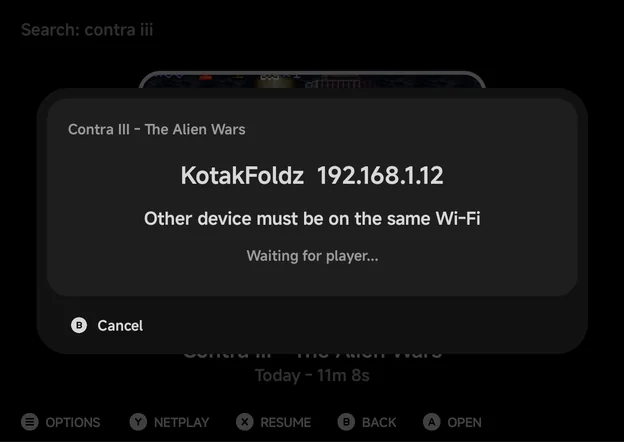
- When a player connects, the status reads Player connected, then Sending saves..., and the game starts.
- If a joiner is turned away, such as one on another emulator, the host keeps waiting for the next one.
BCancel stops hosting.
Joining
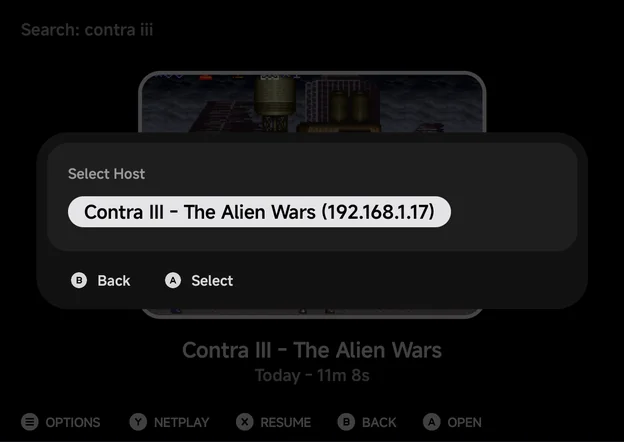
Over Wi-Fi, Join Game opens Select Host. It lists every device hosting on the same network, phones and handhelds alike, with the game and its address, such as Contra III - The Alien Wars (192.168.1.23).
- Press
Aon the host. The screen reads Connecting..., then Receiving saves..., then Connected - starting game.... - The list reads Searching for hosts... until a host shows up. After two minutes with none it says No host found.
Bgoes back to the sheet.
Different versions of one game
You can join a host running a sister version of your game, such as Pokémon Ruby and Sapphire. The phone asks first:
The host is running Pokemon - Ruby Version
You are running Pokemon - Sapphire Version
Join anyway?
Press A Join to join, or B Back to pick another host. Only join
when you know the two games link: the app can't tell a sister version from
a different game.
USB Cable
No Wi-Fi nearby, or a laggy one? Join the two devices with a USB-C data cable. A cable is steadier than Wi-Fi, and the Game Boy Advance's real link cable needs it.
Phone and handheld:
- Plug the cable into the handheld's bottom USB-C port (the charging port) and into the phone.
- On the phone, set Connection to USB Cable and pick Host Game or Join Game.
- On the handheld, press
Y, pick the other role and choose USB Cable.
Two phones:
- Join them with a USB-C to USB-C cable.
- Both set Connection to USB Cable. One picks Host Game, the other Join Game.
- If they don't connect, open the USB notification on one phone and switch USB controlled by to the other phone.
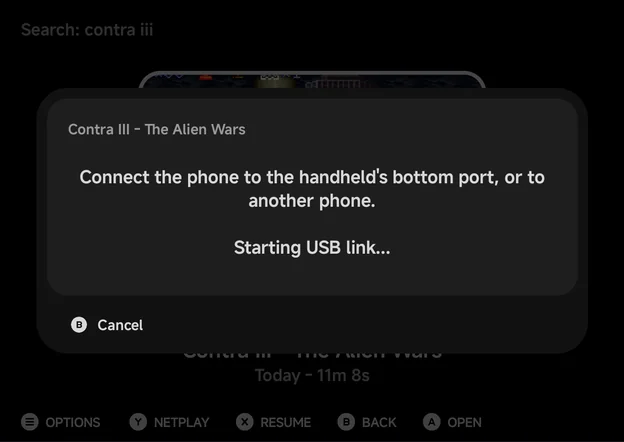
- Android asks once to allow a VPN. It only carries the cable link, nothing else. Another VPN app that is always on blocks the cable: turn it off first.
- There is no host list. The joiner connects straight to the other end of the cable. The host's screen reads USB and Connected by USB cable.
- 2 players only. One cable joins two devices.
- Same NX Redux version on both. Otherwise the phone says Both devices need the same NX Redux version.
If no link comes up within about 30 seconds, the phone says No USB link and what to check: the handheld's bottom port, USB Cable picked on the handheld, or USB controlled by on two phones.
Host and Join don't depend on the cable
Either device can host, whichever end of the cable it has.
More detail
- Pull the cable out mid-game and plug it back in before the countdown ends (about 28 seconds), and the match carries on.
- A phone that can't use the cable has no Connection row, and plays over Wi-Fi only.
- If the other phone took control of the USB connection, the phone says so and points to USB controlled by.
Supported systems
Netplay works only for games in these folders. Every other system, such as
Nintendo 64, Dreamcast, Nintendo DS, Nintendo 3DS and PSP, has no
Y Netplay.
| System | Roms folder |
Emulator for the match | Netplay type |
|---|---|---|---|
| NES / Famicom Disk System | FC, FDS |
FCEUmm | Lockstep |
| Super Nintendo | SFC |
Snes9x, or Supafaust | Lockstep |
| Super Nintendo | SUPA |
Supafaust, or Snes9x | Lockstep |
| Sega Genesis, Master System, Game Gear, SG-1000, Sega CD | MD, SMS, GG, SG1000, SEGACD |
PicoDrive, or Genesis Plus GX | Lockstep |
| Sega Genesis, Master System, Game Gear, SG-1000, Sega CD | GPGX |
Genesis Plus GX, or PicoDrive | Lockstep |
| Sega 32X | 32X |
PicoDrive | Lockstep |
| PlayStation | PS |
PCSX-ReARMed, or SwanStation | Lockstep |
| PlayStation | PSX |
SwanStation, or PCSX-ReARMed | Lockstep |
| Arcade | FBN |
FinalBurn Neo | Lockstep |
| Game Boy / Game Boy Color | GB, GBC |
Gambatte | GB Link |
| Game Boy Advance | GBA |
gpSP, or mGBA (USB Cable only) | GBA Link |
| Game Boy Advance | MGBA |
mGBA, or gpSP | GBA Link, USB Cable only |
| Netplay type | What it means |
|---|---|
| Lockstep | Both devices run the same game and swap controller input every frame. For games with a two-player mode. |
| GB Link / GBA Link | The link cable between two Game Boys. Trades and versus battles in single-player cartridges work between the two devices. |
Game Gear
The Game Gear has one controller port: its two-player games used the link cable, which netplay doesn't connect. Both devices play the same game in step, but only games that read a second pad react to the other player.
Emulator
Systems with two emulators have an Emulator row on the sheet.
LEFT / RIGHT change it.
- Auto (match the other device) (default): the phone runs whatever the other device runs, when this folder offers it. With two phones on Auto, the host's emulator wins. A handheld can't switch, so a phone always follows a handheld.
- An emulator by name: the phone runs only that one. A device on another emulator can't join.
When the two don't match, the joiner sees why, such as The host is using PicoDrive (MD folder). Pick the game from the same folder on both devices., or Set Emulator to PicoDrive. when that is one of its own choices. The host flashes A player using Genesis Plus GX was turned away. and keeps waiting.
Game Boy Advance link
Game Boy Advance games link as two GBAs on a cable:
- Over Wi-Fi (gpSP): the link is emulated for the games that need it, and the wireless adapter works (the Union Room in FireRed, LeafGreen and Emerald).
- Over the USB Cable: a real link cable. Cable link play works as on real hardware, such as Pokémon trades and battles, cross-game trades like FireRed with Ruby, and The Legend of Zelda: Four Swords.
- mGBA links over the USB Cable only. A game in the
MGBAfolder offers only USB Cable. A phone that can't use the cable has noYNetplay for it. Setting Emulator to mGBA on aGBAgame over Wi-Fi says mGBA links over the USB cable only.
gpSP's Link Cable Connectivity core option picks the link mode. The host's choice is used by both devices. Leave it on Automatic, or for a cable trade between FireRed/LeafGreen and Ruby/Sapphire, set it to Link Cable - Real (USB only) before hosting. Change it in Game Settings or Emulator Settings: the in-game menu has no Options during a match.
Give each device its own save
Two Pokémon games with the same save share a Trainer ID and refuse to trade.
Saves
Your own save is never overwritten by the other player's.
| Netplay type | Whose save is used |
|---|---|
| Lockstep | The host's. Its save is copied to the joiner, so both start from the host's progress. |
| GB Link and GBA Link | Each player's own. Nothing is copied. |
- The joiner plays on a copy. Its own save is left exactly as it was, and progress made in the match isn't kept.
- The host plays on its real save, so its progress is kept, as long as the match runs on the folder's own emulator or one that shares its saves: gpSP and mGBA, Snes9x and Supafaust, PCSX-ReARMed and SwanStation.
- A host on another emulator, such as Genesis Plus GX for a Sega game on PicoDrive, plays on a copy. The game starts with Using Genesis Plus GX for this match - progress won't be saved.
- If the host has no save for the game, both start fresh.
- Hosting on your real save clears the game's resume point, so Resume can't roll the save back.
More detail
- Only battery saves travel (
.srmand.sav). Save states are never copied. - If the copy fails, the join stops with Could not copy the host's saves. A host that can't share its saves starts the match on empty saves and says Saves not copied - playing on empty saves.
During a match
To keep both devices in step, a match has no save states, cheats, achievements, core options or disc changes. Each device is one player: every controller on the phone, and the on-screen pad, play as that player.
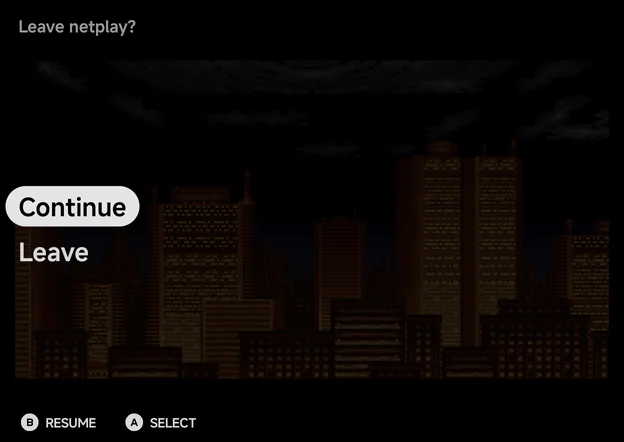
Opening the in-game menu shows only Leave netplay?:
| Row | What it does |
|---|---|
| Continue | Back to the game. |
| Leave | Ends the match for both, and returns you to the game list. |
While your menu is open, or the app is in the background, your input stops and the other player sees Other player paused (30 s) counting down. Come back before it runs out, or the match ends.
Notices at the top of the screen:
| Notice | What it means |
|---|---|
| Waiting for the other player... (N s) | The other device stopped sending. The match ends if it doesn't come back within 30 seconds. |
| Other player paused (N s) | The other player opened their menu or left the app. |
| Netplay ended | The other player left or the connection was lost. You keep playing on your own. The menu is then Continue / Quit. On a copy it reads Netplay ended - progress here won't be saved. |
If the match can't start or breaks, a Netplay failed dialog says why, such as Could not reach the other device. or Netplay failed - the other device's emulator doesn't match., and you go back to the game list.
Not supported
- More than two players.
- The handheld's Hotspot mode.
- Rollback netplay, such as the handheld's Dreamcast GGPO.
- Systems outside the table above.
- The Super Game Boy (
SGB): put Game Boy games inGBorGBCfor link play.