Layouts
Settings → Layouts picks how each main menu tab and the game lists are drawn, which tabs show, and how much chrome sits around them. Changes apply as soon as you leave Settings, with no restart. See Menu Layouts for pictures of every style.
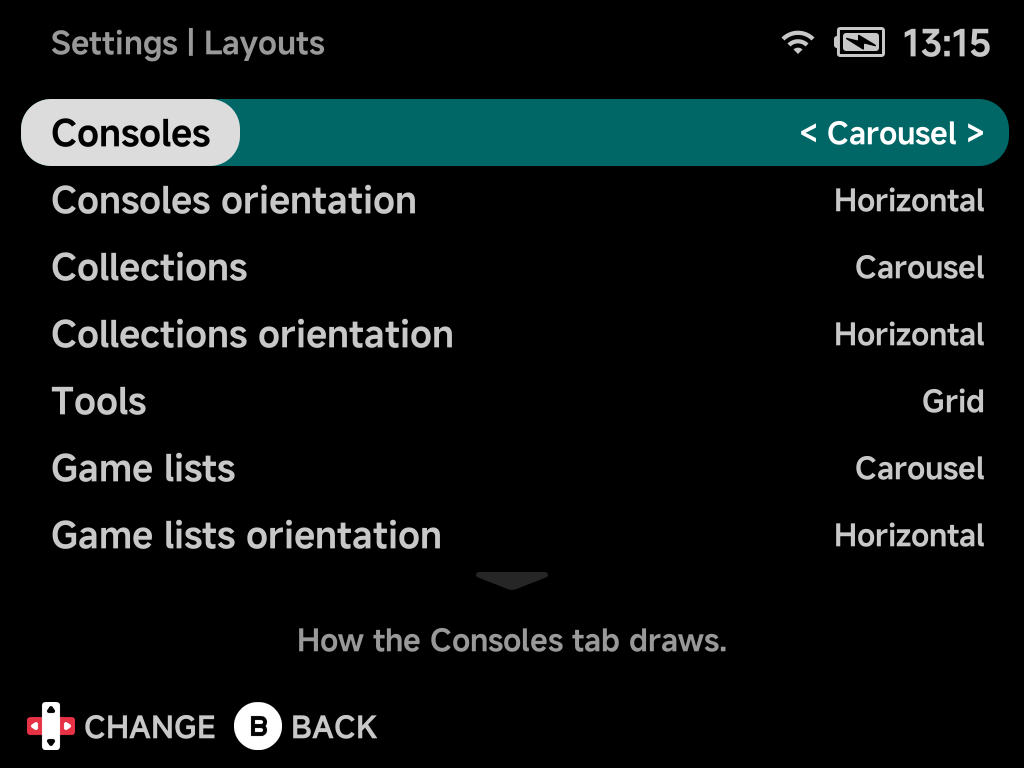
Consoles / Collections / Tools
How each tab draws: List, Grid or Carousel.
| Tab | Default |
|---|---|
| Consoles | Carousel |
| Collections | Carousel |
| Tools | Grid |
Game lists
How a console's or collection's games draw: List, Grid, Carousel or
Backdrop. Default Carousel.
Orientation
Whether a carousel runs across (Horizontal, the default) or down
(Vertical) the screen. Each tab and the game lists have their own
orientation row, directly under their style. The row shows only while that
style is Carousel, or Backdrop for game lists.
Vertical alignment
Which side a vertical game list's stack sits on: Left (default) or Right.
The game's details take the other side. Shows only while game lists are drawn
vertically.
Home tab
Show or Hide (default) the Home tab. Home
still shows when every other tab is hidden.
Consoles tab / Collections tab / Tools tab
Show (default) or Hide each tab. Hide all of them for a Home-only menu, as
in the Five-Game Menu. With a single tab left,
the tab row is replaced by an NX Redux title.
Hidden tabs stay reachable
Pressing MENU on a tab offers each hidden tab (Consoles,
Collections, Tools), so Settings is never locked away. The list
opens over the current tab in the hidden tab's own layout, and B returns.
Controller
Show (default) or Hide each console's controller behind it on the
Consoles tab.
Page title
Show (default) or Hide the tab row on the main menu and the title above a
game list. Hidden, L1 / R1 still switch tabs, and in the List style the
up arrow moves to the top of the list. Carousels run up into the freed row.
Button hints
Show (default) or Hide the button hint bar along the bottom of the menu,
volume and brightness changes included. Hidden:
- the rows keep their place, so nothing jumps;
- a game list in the List style shows the selected game's play time, achievements and next achievement in the bar's row instead;
- carousels run down into the freed row.
Reset to defaults
Resets every option on this page to its default.