PlayStation 2
PlayStation 2 games run on the bundled ARMSX2 core (version 2.9.2), a PCSX2 build for Android phones.
| ARMSX2 | |
|---|---|
| Folder | Roms/Sony PlayStation 2 (PS2)/ |
| Saves | Saves/PS2/<game>/Mcd001.ps2: one memory card per game |
| BIOS | Needed: any PS2 BIOS dump ending in .bin, in Bios/PS2/ |
| File types | iso chd zso, and cso in the PS2 folder |
- A BIOS is needed. Without one the game doesn't start and the app says
Sony PlayStation 2 needs a BIOS: put a .bin file in Bios/PS2/. PS2
dumps have no standard name, so any
.binfile in that folder counts. With more than one, pick which in Settings. - Games open in place: a 4 GB ISO is never copied.
- Graphics API can switch a game to Vulkan. On a phone with an Arm Mali GPU, Auto already uses Vulkan: it is much faster there. See Graphics API.
- PS2 games need a fast phone. They run at full speed on a Snapdragon 8 Elite class phone such as the Galaxy Z Fold.
- Fast forward runs the game as fast as the phone can, up to Max FF Speed.
More detail
- A loose
.csofile belongs to the PSP, which uses the same extension. Put a PS2.csoin the PS2 folder and it runs here. - Multi-disc games load from an
.m3uplaylist. - Phones with 16 KB memory pages are supported.
Controls
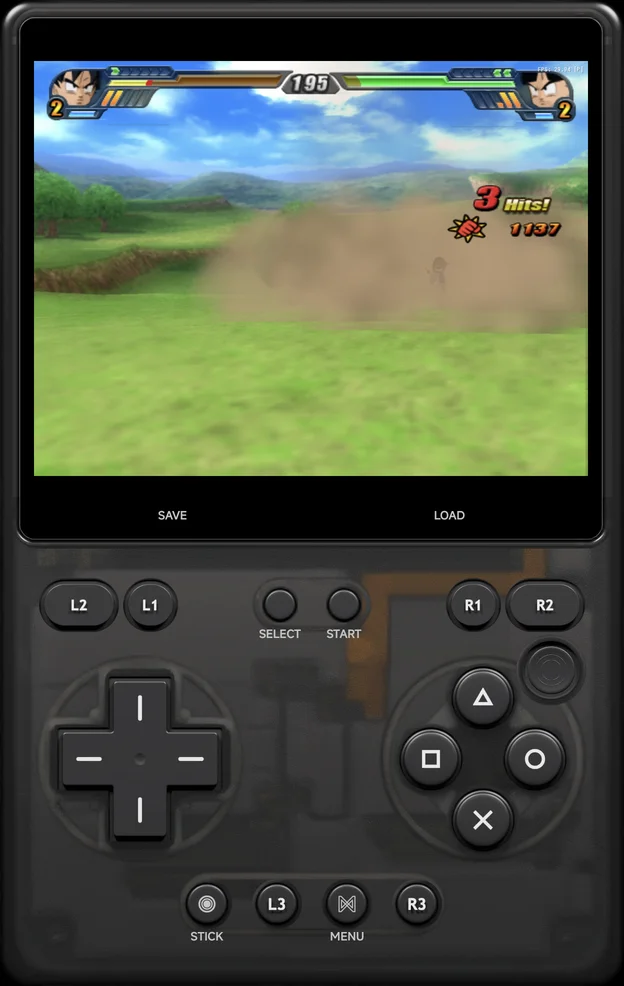
The on-screen pad is the PlayStation pad skin, a full DualShock 2: the d-pad, the face buttons, all four shoulder buttons, the right stick, and L3 and R3 as their own buttons.
On a phone the left stick shares the d-pad's place: D-PAD / STICK switches between them, and the pad starts on the d-pad. Roomier layouts, such as the unfolded Galaxy Z Fold's, show the d-pad and both sticks at once.
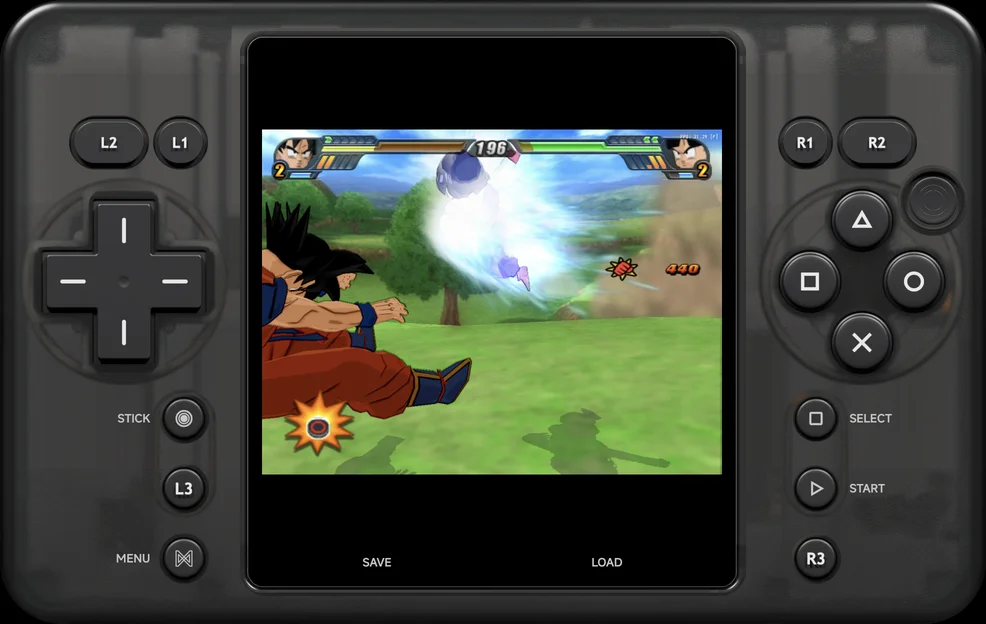
The buttons carry the PlayStation's labels, ○ × △ □, and × confirms in the app's menus, as on the PlayStation. Move or resize any of the groups, the sticks included, in Button layout.
A controller works 1:1, including both sticks, L3 and R3 (press the
sticks) and all four shoulder buttons.
More detail
- The face buttons are on or off: games that read how hard a button is pressed (such as aiming gently in Metal Gear Solid 2) see it fully pressed.
Multiplayer
Two players can play with two controllers: connect a second one and it's Player 2, as on the other consoles. See Multiplayer.
- Each player gets a DualShock 2: the d-pad, both sticks,
L3andR3, and all four shoulder buttons. - The on-screen pad and the in-game menu stay Player 1's.
- Games save to the one memory card in slot 1, Player 1's, as most PS2 games expect.
- Rumble goes to each player's own controller when Android can drive its motor. Otherwise Player 1's rumble plays on the phone, and Player 2 gets none. See Rumble.
More detail
- The PS2 multitap (3 or 4 players) isn't supported.
- Netplay isn't available for PS2 games.
- A second controller port is always plugged in, even when you play alone. Games ignore a pad nobody uses.
Settings
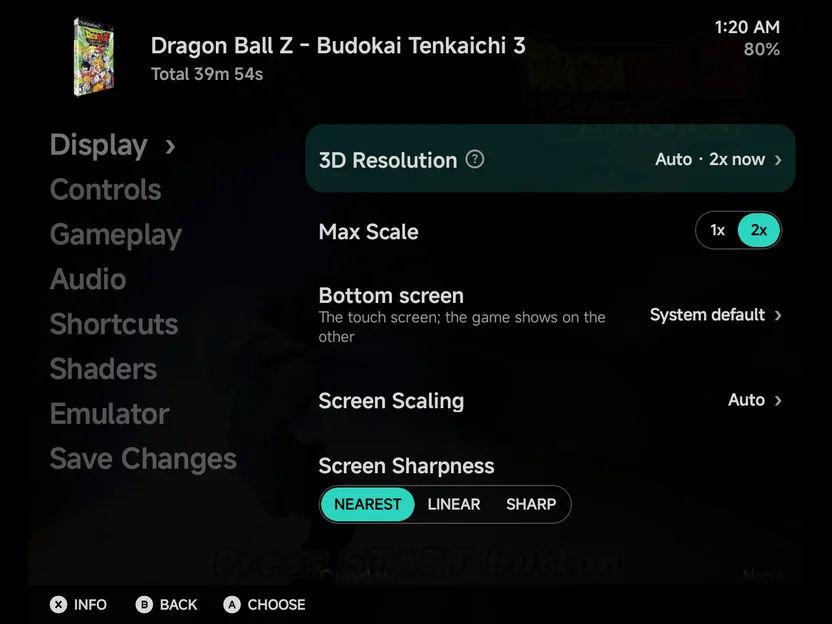
The PS2's own rows are in the in-game menu's Options, on the Display page, and for the console in Emulator Settings. Keep a change for the game or the console with Save Changes.
| Row | Group | Values | Default | See |
|---|---|---|---|---|
| 3D Resolution | Display | Auto, Quality, Performance | Auto | 3D rendering |
| Max Scale | Display | 1x up to what the display can show (shown in Auto only) | 2x | 3D rendering |
These take effect straight away. A few more are read only when the game starts, so they're not in the in-game menu: set them in Game Settings for one game, or in Emulator Settings for the console.
| Row | Group | Values | Default | See |
|---|---|---|---|---|
| Graphics API | Display | Auto, OpenGL ES, Vulkan | Auto | Graphics API |
| GPU driver | Display | Default, System driver, then each driver you added (shown on Vulkan) | Default | GPU driver |
| PS2 BIOS | Gameplay | Auto, then each .bin file in Bios/PS2/ (shown when there is more than one) |
Auto | BIOS |
| Audio Buffer | Audio | Auto, 50 ms, 75 ms, 100 ms | Auto | How much sound is kept ready. Auto keeps 50 ms on PS2, more than the 33 ms of lighter consoles, so slow moments don't crackle. |
The emulator's own options are on the Emulator page.
BIOS
Put a PS2 BIOS dump in Bios/PS2/. Any file ending in .bin counts, whatever
its name. With one file, the game boots it. With several, PS2 BIOS in
Settings picks one; Auto lets the core choose.
More detail
- The
.nvmand.mecfiles PCSX2 writes beside a BIOS don't count as a BIOS. - The app copies the BIOS before each launch, so a file you add shows up the next time you start a game.
Saves
Each game gets its own memory card, as if every game had a card of its own
in slot 1: Saves/PS2/<game>/Mcd001.ps2, in a folder named after the game.
Mcd001.ps2 is the card's file name ("memory card 1"), the same for every
game; the folder tells them apart.
Save states, the Game Switcher and resuming where you left off work as on the other consoles. Rewind isn't available for PS2: a PS2 state is up to 68 MB.
3D rendering
3D Resolution in Settings sets how sharply the game is drawn. The screen's size doesn't change. ARMSX2 renders at a whole multiple of the PS2's own picture (640 × 448), from 1x to 4x.
| Mode | What it does |
|---|---|
| Auto | Draws at the multiple the picture is shown at, up to Max Scale (2x by default). |
| Quality | The same with no cap: as sharp as the display can show, up to 4x. |
| Performance | Native, 1x. |
Max Scale shows only in Auto. A higher scale is sharper but slower: if a game stutters, lower Max Scale or try Performance.
In a game the row reads like Auto · 2x now in Auto and Quality, the scale in use. A change takes effect after about a second, without restarting the game.
More detail
- The lists follow the display: the Galaxy Z Fold's inner screen reaches 4x, its cover screen less.
- With the picture on a second display, the scale is measured there. On a 1080p TV, Max Scale offers 1x and 2x, and Quality draws at 2x.
- Dragon Ball Z: Budokai Tenkaichi 3 holds 60 fps at 4x on the Galaxy Z Fold, with Vulkan. Heavier games may not, which is why Auto stops at 2x unless you raise Max Scale.
- On a Mali phone, Vulkan is the fast way to draw PS2 games. Dragon Ball Z: Budokai Tenkaichi 3 runs at 55 to 58 fps on the AYANEO Pocket Air Mini with Vulkan, against 22 to 28 on OpenGL ES. The malisx2 GPU driver works there too.
- Fast forward gains little where the phone is already at its limit. On the AYANEO Pocket Air Mini the same game reaches about twice its speed with 3D Resolution on Performance, and barely more than full speed at 2x.
- ARMSX2's own GS Renderer, Internal Resolution and BIOS options don't appear on the Emulator page: Graphics API, 3D Resolution and PS2 BIOS set them. Software Renderer Threads is hidden too: the app never uses the Software renderer.
Cheats & Patches
Cheats & Patches (Cheats & Patches) downloads PCSX2's
patches.zip for PS2 alongside libretro's cheats for the other consoles. It
holds widescreen and no-interlacing patches for many games, matched to each
game by the game itself. Turn them on under Emulator in
Game Settings for one game, or in
Emulator Settings for every PS2 game. They need the
game restarted, so the in-game menu doesn't list them:
| Option | What it does |
|---|---|
| Widescreen Patches | Draws supported games in 16:9. Set Aspect Ratio to 16:9 alongside it. |
| No-Interlacing Patches | Draws supported games progressive, sharper than any deinterlacer. |
| Enable Cheats | Loads your own .pnach cheat files from Cheats/PS2/. Every cheat in the game's files is turned on. |
Leave Aspect Ratio on Auto: the widescreen patch switches the picture to 16:9 itself. The picture gets wider without stretching: you see more of the scene at the sides.
More detail
- libretro's cheat collection has no PS2 cheats, so the in-game menu's
Cheats page has none for PS2 games. PS2 cheats come as
.pnachfiles, each named after the game's CRC: put them inCheats/PS2/. - The patches come from the PCSX2 project and are downloaded to your phone when you ask; the app doesn't include them.
Achievements
RetroAchievements: not available for PS2 games in the app.