Sega Dreamcast
Play Dreamcast games, plus the Sega Naomi and Sammy Atomiswave arcade
games built on the same hardware. Flycast also plays those arcade boards, from
the same folder. Put them all in Roms/DreamCast (DC)/.
Dreamcast games need no BIOS; the arcade games
do.
Dreamcast gets the same features as the other systems:
- the in-game menu with save states (slots with previews), auto-resume and the Game Switcher
- fast-forward, screenshots, shaders and screen effects
- playtime tracking and ambient LEDs
- RetroAchievements through NX Redux
Upgrading from an older NX Redux
Save states made with the old emulator can't be loaded by the new one. Save your progress in-game (on the memory card) before updating if you rely on a save state. Your memory cards come across automatically (see Memory cards).
More detail
Dreamcast games run on Flycast (v2.7), bundled as a libretro core and played inside NX Redux's own emulator, like most other systems. That's why it gets the same features.
Older versions ran Dreamcast on a standalone Flycast with its own overlay menu.
Controls
The face buttons map to the Dreamcast pad by position, the way the Dreamcast controller is laid out:
| Device button | Dreamcast button |
|---|---|
Bottom (B on the cap) |
A |
Right (A on the cap) |
B |
Left (Y on the cap) |
X |
Top (X on the cap) |
Y |
So a "Press A" prompt means the bottom button, not the cap printed A.
| Device control | Dreamcast control |
|---|---|
| D-pad | D-pad |
| Left stick | Analog stick |
L2 / R2 |
Analog triggers |
| SELECT | Insert a coin (Naomi and Atomiswave) |
On Naomi and Atomiswave games the four face buttons act as the cabinet's buttons. To change the mapping, use Options → Controls in the in-game menu, as for any other system.
More detail
Mapping by position means games that put the camera or movement on the face buttons (Unreal Tournament, for one) play as designed.
The mapping is the same under either Button Layout. Only the in-game menu's confirm and back follow that setting.
Memory cards (VMU)
Every game gets its own memory card, stored next to your other saves. Multi-disc games share one card, so Shenmue's discs all use the same card.
To give a game a fresh, empty card:
- Delete the game's
.A1.binfile inSaves/DC/. - Launch the game. It starts with a blank card.
Renaming a ROM
Renaming a ROM leaves its card behind under the old name, as with any save. Rename the card to match.
More detail
Each card is saved as:
Saves/DC/<rom name>.A1.bin
For example Saves/DC/Soulcalibur (USA).A1.bin.
- Multi-disc games: a
(Disc 1)/(Disc 2 of 3)tag in the file name is ignored, which is how the discs share one card. - The names match NX Redux Mobile: copy a card between your phone and handheld and it just works.
- Card writes are saved immediately, so a crash or a forced quit can't leave a half-written card.
Coming from an older version? The standalone emulator kept one shared
card for all games. The first time you launch each game, its new card
starts as a copy of that shared card, so every existing save is still
there. The old card itself is never changed or deleted. It stays in
.userdata/shared/DC-flycast/ as a backup. Your console settings and
arcade high scores are copied over the same way, once.
When you delete a game's .A1.bin for a fresh card, the old shared card
is not copied back.
BIOS
Dreamcast runs out of the box without a BIOS. To boot through the real
BIOS instead, drop dc_boot.bin into Bios/DC/.
More detail
Without a BIOS, Flycast uses its built-in replacement (HLE).
A RetroArch-style Bios/DC/dc/ subfolder also works. If it exists, it's
used instead.
Flycast also keeps the console's settings and clock (dc_nvmem.bin) and
a couple of shared files in that same folder. Leave them there.
Settings
Change Dreamcast's settings in Options → Core Options in the in-game menu. You can also set them before launching, per game or for all games, in the game list's Emulator Options.
| Setting | What it does | Default |
|---|---|---|
| Internal Resolution | Higher values look sharper but cost speed. Can be changed mid-game. | 640×480 on every device |
| Widescreen Hack | — | On for the Smart Pro S (16:9 screen); off for the Brick and Brick Pro |
| Auto Frame Skip | Stays on for heavy 3D scenes | — |
| Netplay Input Delay | See Netplay | 1 |
More detail
- Internal Resolution: 640×480 is the Dreamcast's own resolution. The Brick has little to spare, while the Smart Pro S can handle 960×720 in lighter games.
- Core Sync: Dreamcast uses the Emulated Core Sync by default. It follows the game's own timing, so games that run at 30 fps (Metal Slug 6, Quake III Arena) play at their real speed.
- Debug HUD: shows an extra
EMU nn%line with the true emulation speed. It's the easiest way to tell whether a heavy scene keeps up.
Arcade games (Naomi & Atomiswave)
Naomi and Atomiswave games are MAME-style zips. To play them:
- Put the zips straight into
Roms/DreamCast (DC)/, next to your Dreamcast games. -
Put the board's BIOS zip in
Bios/DC/. Without it, the game can't start.Board BIOS file Naomi naomi.zipAtomiswave awbios.zip -
Launch the game and press SELECT to insert a coin. As on the real cabinets, START works only after a coin.
Don't rename the zips
Like FBNeo arcade zips, the emulator identifies a game by
its short zip name (mslug6.zip, not Metal Slug 6.zip).
The game list still shows readable names: ikaruga.zip shows as Ikaruga.
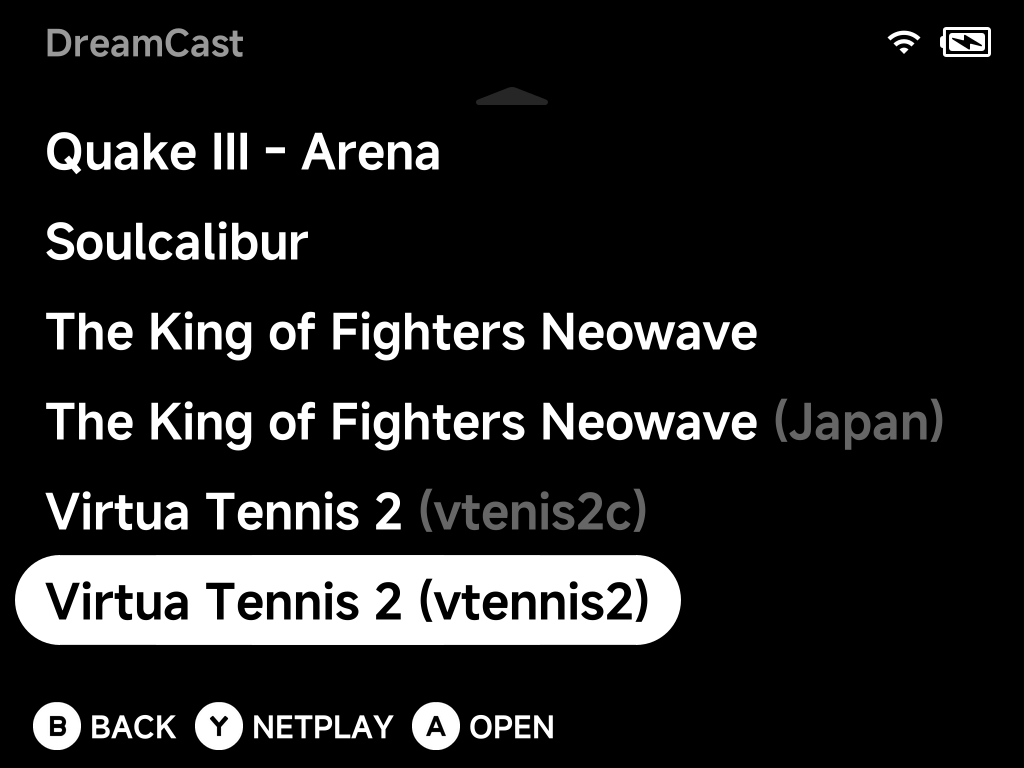
Several versions of one game can sit side by side, each labelled so you can
tell them apart.
More detail
Names. Each zip gets its full title from Flycast's own game list
(ikaruga.zip shows as Ikaruga, mvsc2.zip as Marvel vs. Capcom 2).
The in-game menu shows the same title. Dreamcast disc images keep their
filenames. A Rename Rom or
map.txt alias
always wins over that title. A BIOS zip placed in the game folder by
mistake is hidden from the list.
Several versions. Each row gets the detail that tells it apart, the same way as on Arcade:
- the region (Mazan: Flash of the Blade (World) / (Japan) / (US))
- else Flycast's version detail (Dead or Alive 2 (Rev A))
- the parent set keeps the plain title (The King of Fighters Neowave next to … (Japan))
- versions with nothing else to tell them apart show the zip name in brackets
Atomiswave BIOS: both MAME sets work. Either awbios.zip variant is
accepted: the older MAME set (bios0.ic23) and the current MAME re-dump
(bios.ic23_l).
Saves. High scores and cabinet settings are saved in
Saves/DC/reicast/.
RetroAchievements
Dreamcast, Naomi and Atomiswave games use NX Redux's RetroAchievements support, exactly like the other systems:
- sign in once in the tool
- unlocks work offline and sync later
- they show up in the tool straight away
\"Unsupported Game Version\"
If a game shows up as Unsupported Game Version (title), RetroAchievements recognises your disc but hasn't tested that particular dump with its achievements. Use one of the versions listed on the game's Supported Game Hashes page on retroachievements.org.
Netplay
Dreamcast supports GGPO netplay for 2 players. It's rollback netplay,
which keeps controls responsive over Wi-Fi. To start, press Y on a game and
host or join, the same way as on other systems (see Netplay).
- The host brings the save. The session uses the host's memory card, console settings and (for arcade games) high scores. The other player's own saves are never touched.
- Arcade games need their BIOS zip on both devices.
- Jerky corrections? Raise Netplay Input Delay in Core Options. It costs a little input lag.
- Speed: fights run at around 70% on current handhelds. Expect some audio stutter in heavy scenes.
Pause or leave a session
GGPO can't pause cleanly. Pressing MENU shows only Leave netplay?, and
the other player's game waits while it's open.
| Press | What happens |
|---|---|
B |
Continue playing |
A |
Leave the session |
You leave automatically
If you don't answer within 20 seconds, you leave automatically. Putting the device to sleep also leaves the session. The other player sees Netplay ended straight away.
If the two devices' saves don't match (for example a card copied by hand), the session refuses to start rather than going out of sync. It shows Netplay failed.
More detail
- Saves: the other player plays on a temporary copy of the host's
save. The host keeps a backup of what it brought in
.userdata/shared/DC-flycast/netplay-backup/. - BIOS: both devices use the real BIOS only when both have the same
dc_boot.bin. Otherwise both use the built-in BIOS for that session, automatically. - Settings that change how the game plays are kept the same on both sides for the session, whatever each device has set. These are region, language and broadcast (which follow the disc and the host's console settings), plus CPU clock, DSP, widescreen cheats and memory-card layout.
- Display settings (resolution, widescreen, frame skip) stay per device.
- Netplay Input Delay ranges 0–5 (default 1) and is each player's own.
- Speed: menus run at full speed. The ~70% in fights is about the same as the old standalone emulator.