Other Systems
The other bundled systems play as you would expect. This page lists what is special about each one: its folder notes, settings and buttons that do something more than the console's own pad.
A controller's face buttons work by the printed letter on the NES, Super
Nintendo, Game Boy, Virtual Boy, Pokémon mini, Atari Lynx, WonderSwan and
Neo Geo Pocket, and by position on the Sega consoles, TurboGrafx-16,
PICO-8, Atari, ColecoVision and Doom; see
Controls. MENU, or SELECT +
START, opens the in-game menu on every system.
Sega Genesis, Sega CD and 32X
Sega Genesis uses the MD tag, and the app creates
Roms/Sega Genesis (MD)/. Genesis, Master System, Game Gear, SG-1000 and
Sega CD run PicoDrive, as on the handheld, with Genesis Plus GX (GPGX) as
their second emulator; see
Choosing an emulator. 32X runs PicoDrive
only.
More detail
- Battery saves are shared by PicoDrive and Genesis Plus GX, so a game switched to the other emulator keeps its progress. Save states stay per emulator.
- A handheld
Sega Genesis (GPGX)orSega Master System (GPGX)folder is just that console's folder. Its tag names the console, not the emulator.
Controller Type
Sega Genesis, Sega CD and 32X games have Controller Type in the in-game menu's Options → Console Settings:
| Value | What the game sees |
|---|---|
| Auto (default) | A 6-button pad only for games made for one, else a 3-button pad |
| 3 buttons | A 3-button pad |
| 6 buttons | A 6-button pad |
Some older games misbehave with a 6-button pad. The on-screen pad changes to match. See Controls. In a two-player game, Player 2 gets the same pad; see Local Multiplayer.
Buttons
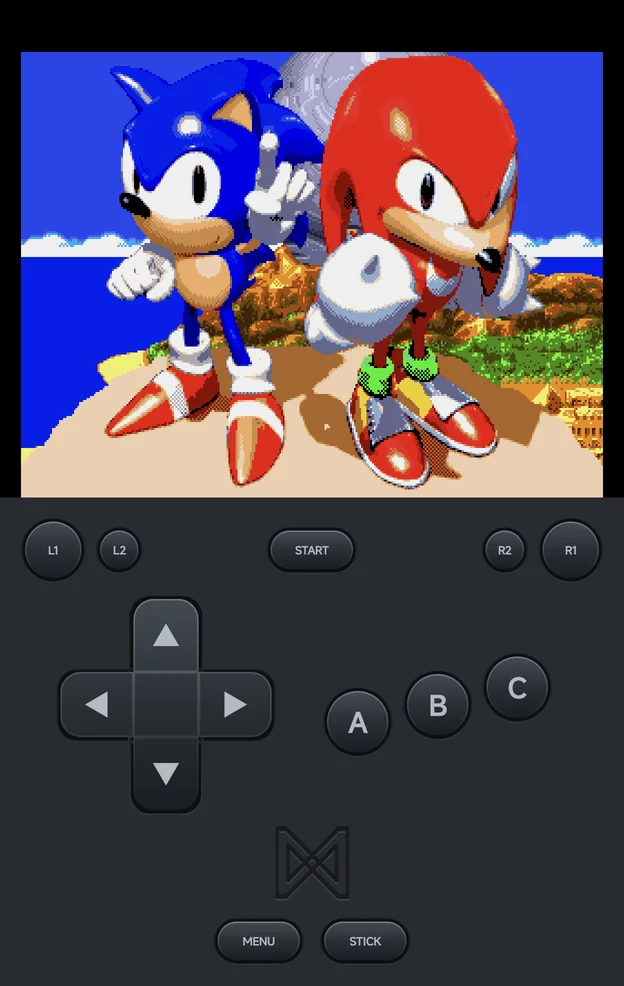
The on-screen pad draws the Sega pad. A controller plays it by position:
| Controller | 6-button pad | 3-button pad |
|---|---|---|
| Left, top and right face buttons | A, B, C |
A, B, C |
| Bottom face button | X |
Not used |
L1, R1 |
Y, Z |
Not used |
SELECT |
Mode |
Not used |
NES and Famicom Disk System
| Control | What it does |
|---|---|
L1 |
Flip the disk to its other side (Famicom Disk System) |
R1 |
Insert or eject the disk (Famicom Disk System) |
R2 |
Insert a coin (Vs. System games) |
The Famicom Disk System needs its BIOS: disksys.rom in Bios/FDS/ (or
Bios/FC/, as on the handheld).
Game Boy, Game Boy Color and Game Boy Advance
| Control | What it does |
|---|---|
X, Y |
Turbo A, Turbo B |
L2, R2 |
Turbo L, Turbo R (mGBA and Super Game Boy only) |
The on-screen pad marks them TA, TB, TL and TR.
Link cable
Game Boy, Game Boy Color and Game Boy Advance games link with another phone or an NX Redux handheld over Netplay, for trades and versus battles. Each player keeps their own save.
- Game Boy and Game Boy Color link over Wi-Fi or the USB Cable.
- Game Boy Advance on gpSP (
GBA) links over Wi-Fi, with the wireless adapter, or over the USB Cable as a real link cable. - mGBA (
MGBA) links over the USB Cable only. - Super Game Boy (
SGB) has no link play.
See Netplay → Game Boy Advance link.
Neo Geo Pocket / Color
| Control | Neo Geo Pocket |
|---|---|
A, B |
A, B |
START |
Option |
TurboGrafx-16
| Control | TurboGrafx-16 |
|---|---|
| Right, bottom, left, top face buttons | I, II, III, IV |
L1, R1 |
V, VI |
START |
Run |
L2 |
Mode |
CD games need syscard3.pce in Bios/PCE/.
Master System, Game Gear, SG-1000 and Atari 7800
The bottom and right face buttons are 1 and 2.
Atari 2600
The bottom face button is Fire.
Atari Lynx
L1 and R1 are Option 1 and Option 2.
Virtual Boy
| Control | Virtual Boy |
|---|---|
L2, R2 |
The right d-pad's up and left |
| Right stick | The right d-pad (controllers only) |
X |
Low-battery toggle |
Games show in anaglyph 3D out of the box.
Pokémon mini
| Control | Pokémon mini |
|---|---|
R1 |
C |
L1 |
Shake |
SELECT |
Power |
X |
Turbo A |
PICO-8
The bottom and right face buttons are O and X. PICO-8 games have no save
states, and don't resume where you left off.
Doom
Doom runs on PrBoom. SELECT shows the automap and START opens Doom's own
menu. Rumble is on out of the box.