Game Boy Advance
NX Redux ships two Game Boy Advance cores, gpSP and mGBA. You choose
one per game by which Roms folder the game is in:
| gpSP | mGBA | |
|---|---|---|
| Folder | Roms/Game Boy Advance (GBA)/ |
Roms/Game Boy Advance (MGBA)/ |
| Strength | Faster | More accurate, better for ROM hacks |
| Netplay (GBA Link) | Yes, for link and wireless adapter games | Link cable games; Wi-Fi and Hotspot too for games with a Wi-Fi mode |
| BIOS | Recommended: Bios/GBA/gba_bios.bin |
Optional: Bios/MGBA/gba_bios.bin |
| File types | gba bin agb gbz |
gba |
Which one to use
Start with gpSP in the GBA folder. It is the faster core, and the right
choice for most games.
Use mGBA in the MGBA folder for ROM hacks, and for any game that
glitches, crashes or runs incorrectly on gpSP. mGBA trades some speed for
accuracy, so it handles games that gpSP gets wrong.
Netplay needs a game that supports link play
Netplay only works with games that support the GBA link cable or wireless adapter, such as trading and versus modes. gpSP plays over USB Cable, Hotspot and WiFi, wireless adapter included. mGBA plays games with a Wi-Fi mode (the wireless adapter, Pokémon and Advance Wars) over Wi-Fi and Hotspot too; its other link cable games, such as Mario Kart: Super Circuit, link over the USB Cable only. See mGBA link.
More detail: netplay
Netplay connects the GBA link cable (and, on gpSP, the wireless adapter), so games without link play have nothing to connect. Both players must use the same folder, except that a gpSP device and an mGBA device can link when their games use the same Wi-Fi mode. On gpSP the joiner plays with the host's Link Cable Connectivity setting for the session, and keeps its own for its next game.
gpSP and the BIOS
gpSP has a built-in replacement BIOS, so games start without one. The
real gba_bios.bin in Bios/GBA/ improves compatibility.
Clock
Games with a clock on the cartridge, such as Pokémon Ruby, Sapphire and Emerald and ROM hacks like Pokémon Unbound, follow your device's time on both cores. Berries, day and night and daily events keep going while the device is off, including after you quit with a save and resume.
More detail
gpSP's clock is set in the in-game menu under Options → Core Options → RTC Time Source:
- System Clock (default): the device's time.
- Deterministic: counts only the time the game runs, and a save state brings back the clock it was saved with. Resuming then rewinds the game's clock to the moment you quit. Use it only when you need a replay to come out the same every time.
mGBA always uses the device's time.
Controls
Both cores share one layout:
| Device button | GBA button |
|---|---|
Right (A on the cap) |
A |
Bottom (B on the cap) |
B |
L1 / R1 |
L / R |
| D-pad (and the left stick, on devices that have one) | D-pad |
SELECT / START |
Select / Start |
A and B follow the Button Layout setting: they
stay on whichever buttons act as A and B.
A few extra controls have no button out of the box. Assign them in the in-game menu under Options → Controls:
- A Turbo / B Turbo (both cores)
- L Turbo / R Turbo (mGBA)
- More Sun / Less Sun (mGBA): adjust the cartridge's solar sensor in the Boktai games
The Super Game Boy runs on mGBA and has the same controls.
Using both
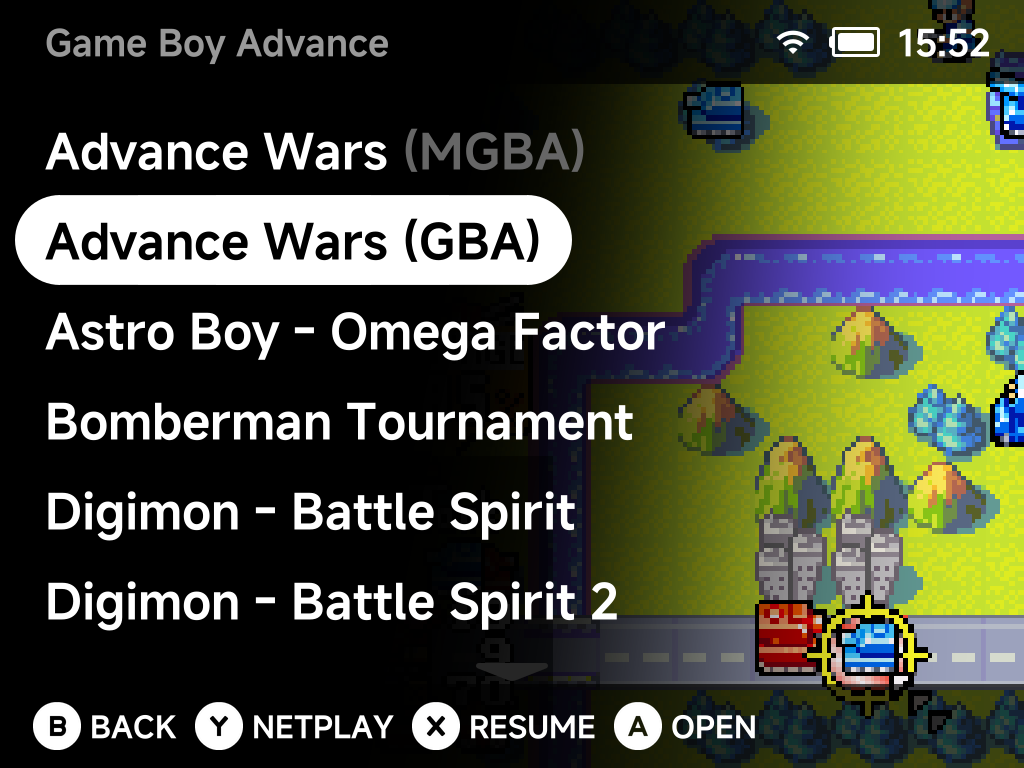
You can keep the same game in both folders. The game list then shows it
twice with the emulator tag, Advance Wars (GBA) and
Advance Wars (MGBA). Pick the core each time you play (see
duplicate names).
Saves are kept per folder, in Saves/GBA/ and Saves/MGBA/. To carry your
progress across, copy the game's save file from one folder to the other.
Save states cannot move between the two cores.
More detail
Battery saves are written in the RetroArch-compatible .srm format by
default, which is why the save file can be copied between the folders.
Super Game Boy
The Super Game Boy (SGB) folder runs Game Boy games on mGBA as a Super
Game Boy. sgb_bios.bin in Bios/SGB/ is optional and gives full Super Game
Boy accuracy.
It has no netplay. Use the Game Boy (GB) folder for
Game Boy link cable games.