PortMaster
PortMaster is the community launcher for game ports: hundreds of games ported to run on handhelds. Install it on the device from the Xtras store's TOOLS tab, and it appears in the Tools menu. It is not part of the core NX Redux install.
Launching
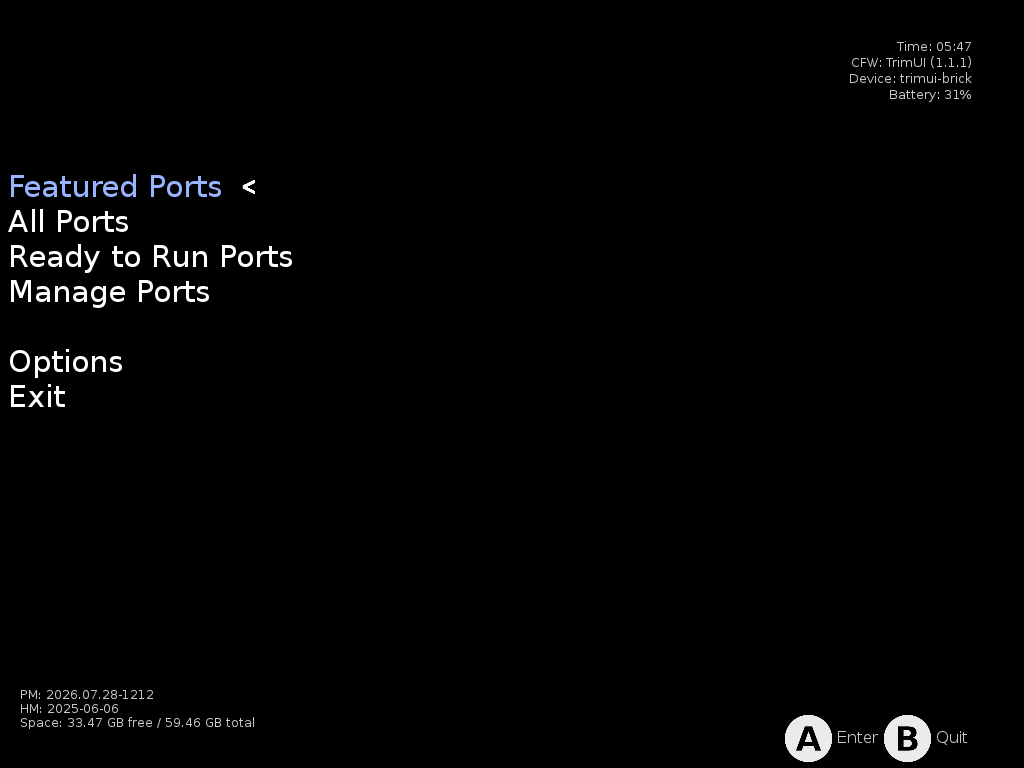
Open Tools → PortMaster to launch the PortMaster interface directly. Ports, and PortMaster itself, follow the device-wide Button Layout setting (Settings → System).
Installing ports
Browse and install ports in the PortMaster interface: Featured, All Ports, and Ready to Run (games that need no extra files).
Installed ports land in the Roms/Ports (PORTS) folder. They show up under
Ports in the main menu and launch like any other game.
Some ports need data files from the original game. Each port's details page says what it needs.
Community catalogs
Besides its own catalog, PortMaster can list games from community-run catalogs. NX Redux makes two of them one install away: NextOS Ports (Android and iOS games) and RHH Ports (GameMaker, RPG Maker, Solarus and more). Add them from the Xtras store's TOOLS tab. Their games then appear in PortMaster and install like any other port.
Easier to install, not guaranteed to work
These catalogs are made for other handhelds. NX Redux makes their ports easy to install, but can't promise any one of them runs. Common reasons one doesn't:
- Memory. NX Redux devices have 1 GB. Some ports build their game data from your files the first time they start, and that can need more memory than the device has. The game then closes during that first start.
- Graphics chip. The Brick and Brick Pro use a PowerVR GPU; most of these ports are built and tested on Mali, the GPU in the Smart Pro S. On the Brick some show a black screen.
- 32-bit only. Some ports exist only as 32-bit (armhf) builds, which NX Redux devices can't run.
- Newer system library. A few need a newer glibc than the TrimUI firmware has.
- Free space. Some unpack several GB of game data on first launch.
Unlike PortMaster's own catalog, these catalogs don't always mark which ports can't run on a device, so PortMaster may still offer them.
Paperboat (RHH Ports) shows two of these. On the Brick and Brick Pro it
stays on a black screen. On the Smart Pro S it starts, but building its game
data from the ROM (pm64.o2r) needs more memory than the device has, so the
first start closes partway through.
More detail
- Where the catalogs live. Each Xtras entry copies the catalog's
source file (
030_rhh.source.json,040_nextos.source.json) intoEmus/shared/PortMaster/config/. PortMaster loads every source file there and refreshes each catalog at most once an hour, when it's opened. - Paperboat workaround (untested). Paperboat builds
pm64.o2ronly when it's missing. Building it with Paperboat on a computer and copying it intoRoms/Ports (PORTS)/.ports/paperboat/skips that step on the device. - Ports that look in
/roms/ports. Some NextOS ports look for their game folder where other firmwares keep ports. The Ports launcher points them at NX Redux's ports folder.
Device support
PortMaster runs on every NX Redux device. It recognises which device it's on by itself, including the Brick Pro and Smart Pro S, and lists only the ports that can run there.
| Device | Analog sticks | Ports listed (October 2026) |
|---|---|---|
| TrimUI Brick / Brick Hammer | None | about 1,190 |
| TrimUI Brick Pro | 2 | about 1,230 |
| TrimUI Smart Pro S | 2 | about 1,230 |
Joysticks are detected automatically. Games that need analog sticks show up on the Brick Pro and Smart Pro S. On the regular Brick they're left out of the list, because there are no sticks to play them with. That's the whole difference in the counts above.
Browsing on the PortMaster website
The PortMaster website doesn't have a filter for the Brick Pro or Smart Pro S yet. Its TrimUI Smart Pro filter is the closest match for both. The list on the device is always the accurate one.
More detail
PortMaster works out what a device can do with its own hardware probe
(device_info.txt), and lists a port only when the device meets the
port's requirements: CPU architecture, analog sticks, memory, screen and
system library version. Since PortMaster 2026.09.19 everything comes from
that probe; the older built-in device tables are gone. NX Redux used to
add the Brick Pro and Smart Pro S to those tables. It now adds what the
new probe misses instead:
- Firmware and model. The probe no longer recognises the TrimUI firmware, so NX Redux adds it back, with the model name taken from the device NX Redux is running on.
- Analog sticks. TrimUI's controller is a virtual device created by the firmware, and the probe ignores virtual controllers. On the Smart Pro S the probe still finds both sticks through the connections the firmware's input service holds open. The Brick Pro has the same chip and screen as the Brick, so NX Redux reports its two sticks itself.
trimuicapability. Porters mark a port that's known to break on TrimUI firmware with!trimui. The new probe dropped the firmware name from the capability list, so those ports showed up anyway; NX Redux puts it back so they stay hidden.
The probe result is cached as
Emus/shared/PortMaster/device_info_trimui_<model>.env. NX Redux clears
the cache whenever it changes the probe, so the next PortMaster start
detects the device again.
Missing runtimes
Many ports rely on a shared runtime (Mono, Godot, Java, …) that PortMaster downloads separately from the game. If you copied ports from another device or SD card instead of installing them through PortMaster, the runtimes don't come along. The port won't start.
Two ways to fix it:
- Reinstall the port from PortMaster. Installing through the app pulls in the runtimes it needs.
-
Download the runtime directly:
-
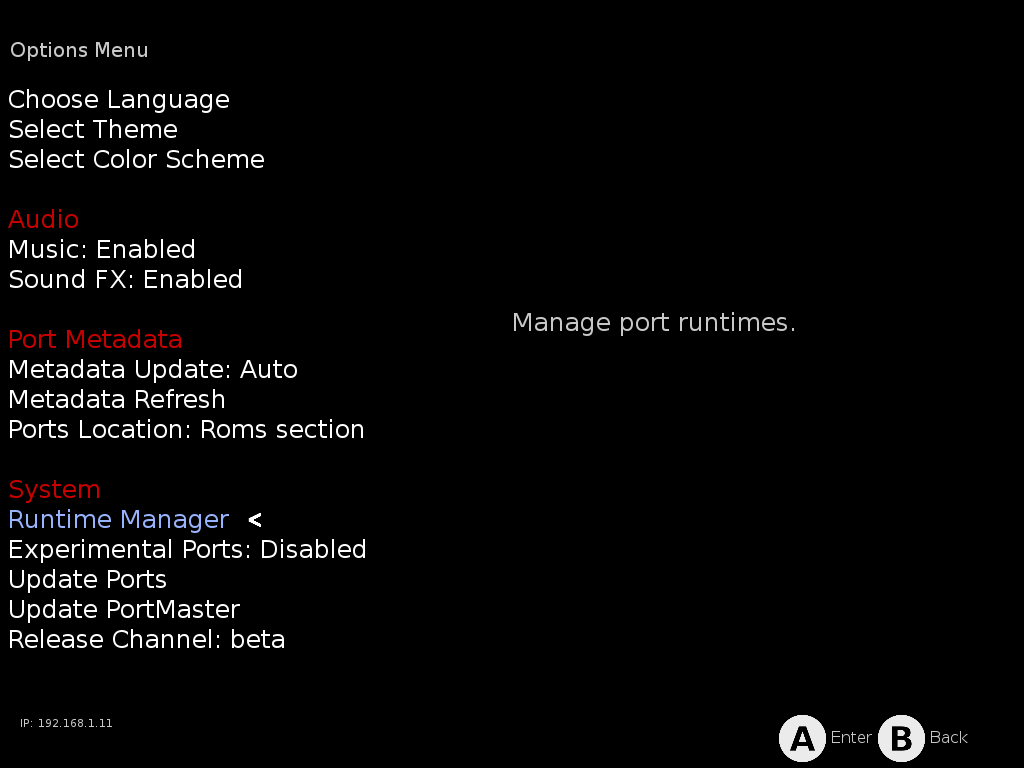
Open Options → Runtime Manager.
-
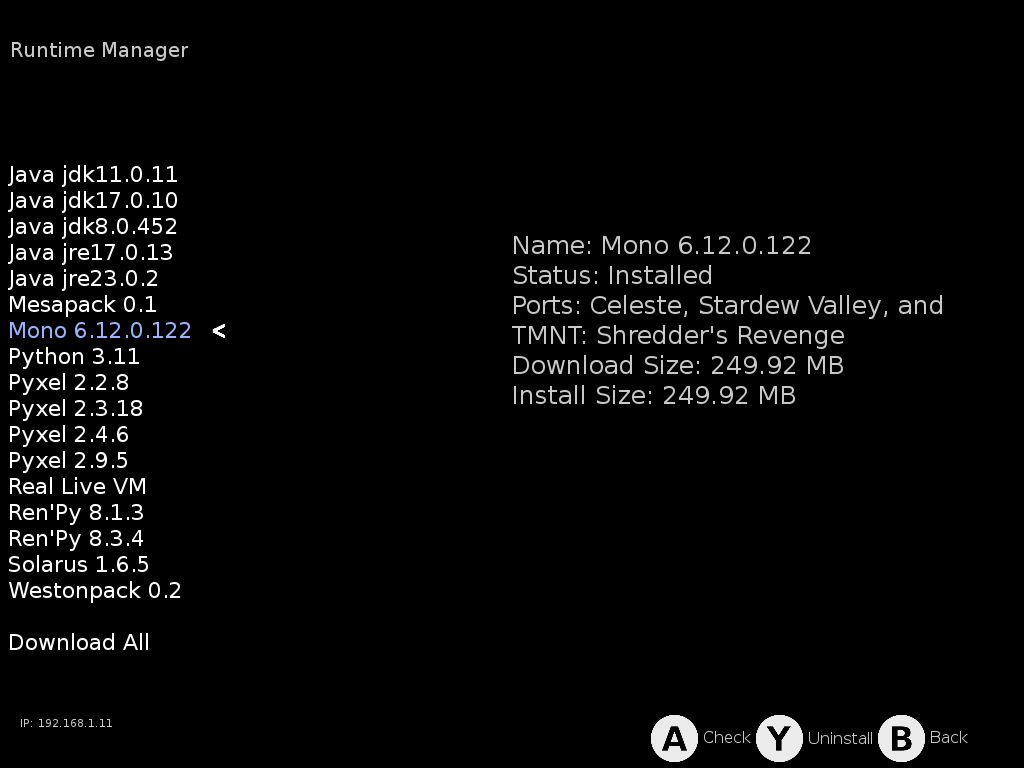
Select the runtime the game needs. The details panel shows its status, size, and which of your installed ports depend on it, so it's easy to spot what's missing.
-
Press
Ato download/check the selected runtime. Or use Download All at the bottom of the list to grab everything at once.
-
Games that don't run
PortMaster hides these games on NX Redux devices, so you won't find them in its list. A copy brought over from another device won't start either.
Built only for 32-bit ARM (armhf). Some older ports exist only as 32-bit builds, which NX Redux devices can't run. 64-bit (aarch64) builds work normally. About 200 ports are affected.
Need a newer system library than the TrimUI firmware has:
| Game | Catalog |
|---|---|
| Five Nights at Freddy's | PortMaster |
| Sternenfuchs | PortMaster Multiverse |
Marked as not working on TrimUI by their porters:
- Chicory: A Colorful Tale
- Osmos
- Spinch
Need more than the device has:
| Game | Needs |
|---|---|
| The Cosmic Wheel Sisterhood | 2 GB of memory |
| Koboo: The Tree Spirit | 2 GB of memory |
| Toziuha Night - Order of the Alchemists | 2 GB of memory |
| Zniw Adventure | 2 GB of memory |
| Brotato | A high-end device |
| Bugdom, Nanosaur | Desktop OpenGL |
More detail
- 32-bit ports. The TrimUI firmware ships no 32-bit libraries or loader. PortMaster's probe reports this and hides armhf-only ports.
- System library. Five Nights at Freddy's and Sternenfuchs need glibc 2.35; the firmware has glibc 2.33. The firmware's glibc can't be replaced safely, since every program on the device depends on it. Five Nights at Freddy's also builds its game engine on the device the first time it runs, so bundling a private glibc for it wouldn't help.
- Memory. The Brick and Smart Pro S report 1 GB to PortMaster.
Games with known quirks
Hunt for the Shadow Rider and Plaque Attack Remake ship a 4:3 and a widescreen version, and pick one when they first start. On NX Redux they always pick the 4:3 one. That's right on the Brick and Brick Pro. On the Smart Pro S they play with black bars at the sides.
More detail
Both launch scripts ask xrandr, a desktop X11 tool, for the screen
size. Handhelds have no X server, so the answer comes back empty, and the
scripts fall back to the 4:3 version. Bundling xrandr wouldn't change
that, and the scripts also read its output with grep -P, which the
firmware's grep doesn't support.
FAQ
A port I copied from another device won't start
Most likely a missing runtime. See Missing runtimes above.
Do ports that use symlinks work?
Yes. The SD card is formatted exFAT/FAT32, which can't store symlinks. Some ports' launch scripts used to create one, mostly to point a game's save folder into its port folder.
PortMaster has already moved almost every port away from symlinks. Ports
now link save folders with a bind mount instead (PortMaster's
bind_directories
helper), which works on exFAT. Over 230 ports in the
PortMaster ports repository
use it. As of October 2026, only two still create a symlink, and neither
needs a fix: Moonlight Old's lands in system memory, not on the card, and
RVGL's only affects its own update check.
NX Redux covers any that remain while the game launches. It doesn't edit
the port's launch script. If a script tries to create a symlink on the card,
NX Redux makes a bind mount instead, the same thing bind_directories does.
There is nothing to fix by hand.
Ports installed with an older NX Redux
Older NX Redux releases replaced some ports' launch scripts with their own copies, Steel Assault among them. Those copies are no longer used, and the folder holding them is removed the next time you open PortMaster. If a port you installed with an older release won't start, reinstall it from PortMaster: your saves stay where they are.
Found a port that still won't start? Open an issue on GitHub with the port's name and the error you see.
More detail
No launch script is edited. NX Redux adds a few helpers to PortMaster's
control.txt, which every port's launch script loads before it starts
the game, so they replace the matching commands for that script only:
ln -s. The helper first tries a real symlink, which still works outside the card (for example in/tmp). When that fails on the card, it bind-mounts the target onto the link path instead (folders and files), and copies it if the mount fails. That's what PortMaster's ownbind_directoriesdoes. Mounts a port leaves under its home or game folder are unmounted when the game exits. Steel Assault shows the switch upstream: this PortMaster commit (March 2026) replaced its twoln -sfvsave-folder links withbind_directories.curl. The TrimUI firmware has an oldcurl, which ports use with PortMaster's certificate bundle. Where nocurlis found, the helper fetches with PortMaster'swgetinstead (for example, Morrowind's optional mod-order rules).rsyncships with NX Redux itself.
Before a game starts, the Ports launcher checks that these patches are in place and re-applies them if PortMaster's own install or self-update put back the stock files. The check is quick, so games start without delay. The PortMaster app also re-applies them each time it opens, since it uses some of the same files itself.
The old replacement scripts lived in Emus/shared/PortMaster/patchedScripts/
and were copied over the matching ports after every PortMaster run. That
also overwrote newer versions of those scripts from PortMaster, which is
why the folder is gone.
Good to know
- Sleep works in PortMaster games. Press the power button like anywhere else.
- Bluetooth and USB-C audio work in ports, along with the game volume setting, including ports that keep their settings in their own folder.
- PortMaster keeps itself up to date (it checks for updates when it starts).
- NX Redux updates keep PortMaster installed. A system update refreshes the PortMaster entry in Tools and the Ports launcher on its own. Your installed ports, saves and PortMaster settings stay where they are, and there is nothing to reinstall.