Arcade (FBNeo)
Arcade games run on the bundled FBNeo core. They need more care than console ROMs:
- the files are zips with cryptic database names
- they must not be renamed
- some games need extra support files
Where games go
Put your game zips, and any BIOS zips they need, straight into
Roms/Arcade (FBN)/:
Roms/Arcade (FBN)/
├── dino.zip
├── mslug.zip
├── neogeo.zip      ← BIOS set, next to the games
└── sf2.zip
Never rename the zips
Renaming breaks the game
FBNeo identifies a game by its zip filename (the MAME-style short
name, e.g. sf2 = Street Fighter II) and by the ROM files inside it.
Renaming sf2.zip to Street Fighter II.zip breaks the game entirely.
You don't need to rename them for readable names either. The game list shows
each zip's full title from FBNeo's own game database: mslug.zip shows
as Metal Slug - Super Vehicle-001.
To pick your own name, use Rename Rom in the
context menu or a
map.txt. Your name
always wins over the database title:
Roms/Arcade (FBN)/map.txt:

mslug.zip   Metal Slug
sf2.zip Street Fighter II
Put the filename, then a single tab, then the display name.
More detail
The title from the database leaves out the revision and region details
(sf2ce.zip shows as Street Fighter II': Champion Edition). Zips the
database doesn't know keep their filename.
Keeping several versions of a game
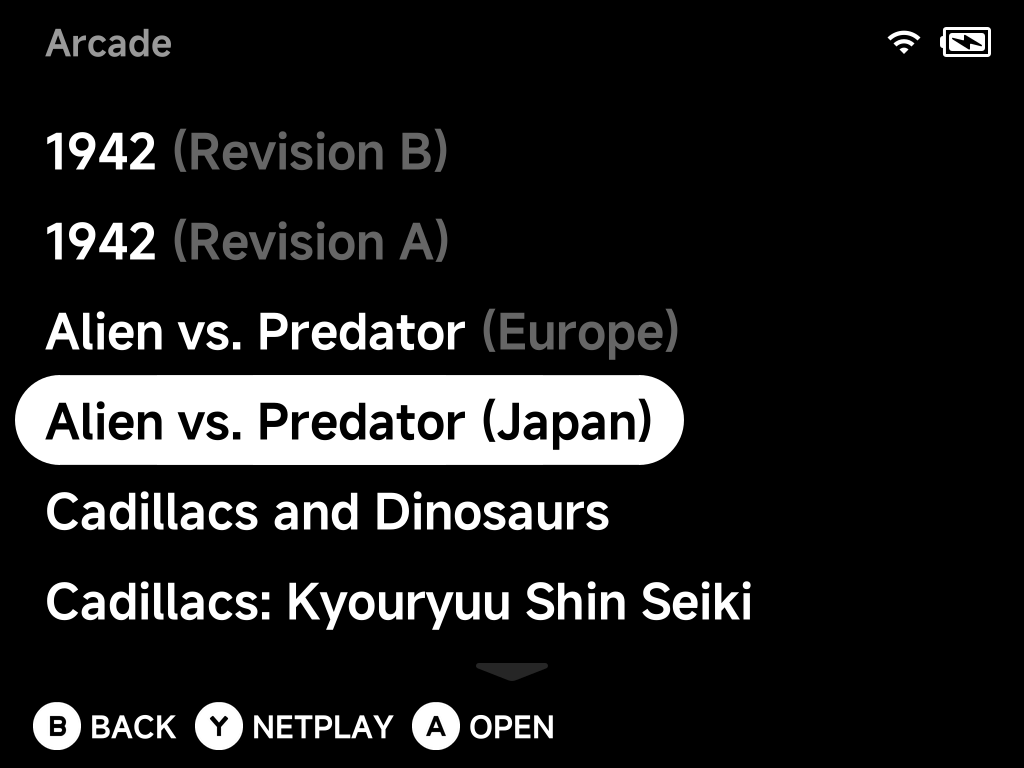
You can keep several versions of the same game in the folder. For example, keep the English set for RetroAchievements and the Japanese one for gameplay. The game list tells them apart with a dimmed detail after the title, such as Alien vs. Predator (Europe) and Alien vs. Predator (Japan).
More detail: how versions are labelled
Versions of the same game share one plain title: avsp.zip (Europe) and
avspj.zip (Japan) are both Alien vs. Predator. The game list adds the
detail the title leaves out:
- Region when each version is from a different one: Alien vs. Predator (Europe) and Alien vs. Predator (Japan).
- The full version detail from FBNeo's database when regions repeat or are missing: Street Fighter II': Champion Edition (Japan 920322) and (Japan 920513), 1942 (Revision B) and (Revision A).
- A version with no detail at all (usually the parent set) keeps the plain title, and the others get theirs.
- If nothing else tells them apart, the zip name goes in brackets: Virtua Tennis 2 (vtennis2) and Virtua Tennis 2 (vtenis2c).
Versions with different titles, like Cadillacs and Dinosaurs (dino)
and Cadillacs: Kyouryuu Shin Seiki (dinoj), show those titles. A
Rename Rom or map.txt name still wins over all of this.
Romset version matters
Use a FBNeo romset, and prefer non-merged sets (each zip self-contained).
- Sets built for MAME or for a different FBNeo version often fail with missing/bad ROM errors. FBNeo only loads zips that match its own ROM database.
- With split/merged sets, a clone needs its parent zip in the same folder.
BIOS sets (neogeo.zip and friends)
Games on BIOS-based boards need the board's BIOS zip in the same folder as
the game. Most commonly that's neogeo.zip for Neo Geo titles (Metal Slug,
KOF, …). The BIOS zip is part of the romset, and its version must match too.
More detail
BIOS zips (neogeo.zip, pgm.zip, …) are hidden from the game list
automatically, so they don't show up as unplayable entries. To show one
anyway, give it an alias in map.txt.
Sound samples
A few classics (mostly pre-1990) play some or all of their audio from sample packs. Games run without samples: those sounds are just missing or replaced by approximations.
More detail
FBNeo looks for sample packs under the system's BIOS folder:
Bios/FBN/fbneo/samples/<game>.zip